
PRs show peaks.
Personal records mark the high points. They are useful, but they do not always show whether your normal working sets are improving.
Learn: Lift Progress
Strength Trends
The goal is not more math. It is clearer feedback from the work you already logged.
Via Fortis turns logged sets into PR history, e1RM trends, and Strength Momentum so you can see whether key lifts are rising, flat, or sliding back.

Definition
A single workout can be noisy. Sleep, stress, exercise order, and fatigue can all change what a set looks like. That is why lift progress is easier to read when you can see recent history and trend direction together.
Spreadsheets can track almost anything, but they are time-consuming to maintain, easy to split across versions, and clunky when you just want to see what is changing. The point is not to replace judgment with a chart. The point is to make the pattern visible enough that your own programming decisions get clearer.
Personal records mark the high points. They are useful, but they do not always show whether your normal working sets are improving.
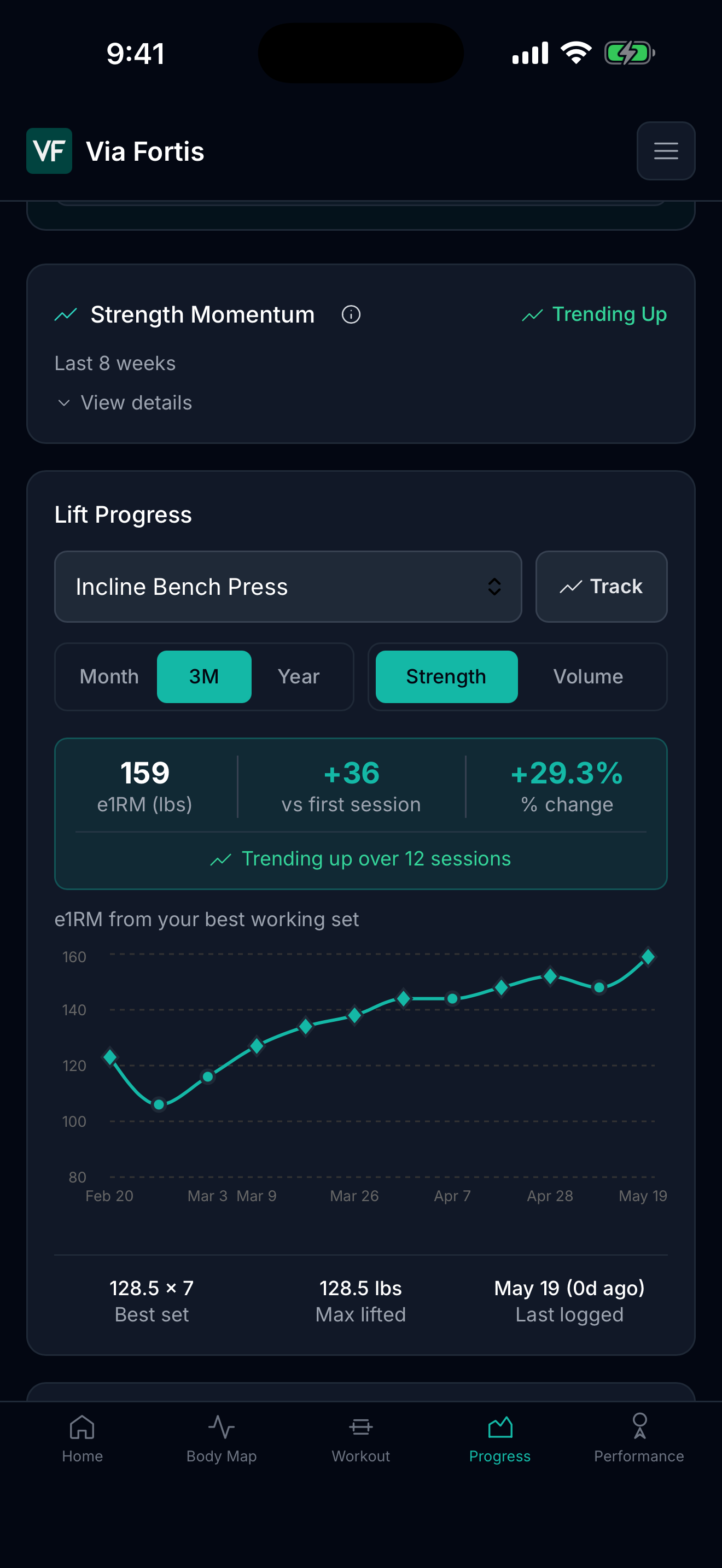
Via Fortis uses the Epley formula to estimate one-rep max from logged working sets, then treats it as a trend signal, not a tested max.
Strength Momentum compares current 4-week average e1RM against the previous 4 weeks for tracked lifts.
Via Fortis Lift Progress
Lift Progress shows the selected lift, the recent e1RM trend, the best working set, max lifted, and when you last trained it.
That gives you a quick read on whether the lift is actually moving, without opening a spreadsheet after every workout.
Why not a spreadsheet?
Spreadsheets can work, but they ask you to maintain formulas, versions, exercise names, dates, and charts. Via Fortis builds the review from the workouts you already logged.
Every Via Fortis user can export their full training history to CSV at any time. If you ever want to analyze it elsewhere, your history comes with you.
FAQ
No. A spreadsheet can work, but Via Fortis can show recent history, best sets, estimated maxes, and trends from the workouts you already log.
Track the exercise, working weight, reps, sets, and enough history to understand direction. PRs, e1RM, and rolling averages help make that direction clearer.
Via Fortis uses the Epley formula to estimate one-rep max from weight and reps. It is a practical trend signal, not a replacement for a true tested max.
Via Fortis is built to keep your plan yours. It surfaces patterns and lift suggestions from your own data, but it is not trying to take over your programming.
Yes. CSV export is available to all Via Fortis users, free or Pro, so your full training history stays portable.
Download Via Fortis on iPhone to review Lift Progress, Strength Momentum, and workout history from the log you already use.